
Searching the Conroe Court Docket
The city's official Conroe Municipal Court Tyler portal gives visitors several ways in. You can pair a citation number with a date of birth. The driver-license route adds an issuing state. Other options include Social Security number plus date of birth, a vehicle plate with its issuing state, first and last name with date of birth, or simply a business name. Never type private identifiers into an unrelated public form.
Match the route to the record you hold. A citation number is the narrowest path when the ticket is in hand. Name searches cast a wider net. License and plate routes work best when those details come from the person's own case.
- Open the official Conroe municipal search.
- Select citation, license, vehicle, name, business, or another displayed route.
- Enter only the fields required for that chosen route.
- Compare the result to the citation and court identity.
- Call the Conroe court if the appearance date or status remains unclear.
Conroe Citation Search Fields
Conroe's interface keeps each search method separate. That layout stops you from filling every field at once. It also explains why a Montgomery County cause number may fail in the city's municipal portal.
| Route | Fields shown | Format note |
|---|---|---|
| Citation | Citation number and date of birth | Date uses MM/DD/YYYY |
| Driver license | License, issuing state, date of birth | Choose the state |
| SSN | SSN and date of birth | Use only for one’s own authorized lookup |
| Vehicle | License plate and issuing state | State is paired with plate |
| Name | First name, last name, date of birth | Business has a separate route |
| Business | Business name | Use the business-name choice |
The main button on the screen is Search. Sign-in, registration, and quick-route controls sit alongside it, but the public field choices set the real lookup paths.
Conroe Municipal Court Basics
Conroe Municipal Court sits at 2300 Plantation Drive, Conroe, TX 77303. The public phone is 936-522-3380. The fax is 936-522-3396. The published email is courts@cityofconroe.org. Office hours run Monday through Friday, 8:00 a.m. to 4:30 p.m. The court closes at 1:00 p.m. on the last Wednesday of each month.
The current OCA directory names Judge Tanya Denice Maddux as presiding. An older official listing gave a prior judge. So the current directory controls on present identity. The 2023 OCA municipal listing states Conroe Municipal Court is not a court of record. That fact shapes what records exist and how appeals work here. It should not be assumed true of other city courts.
Conroe Municipal Court
2300 Plantation Drive
Conroe, TX 77303
936-522-3380
courts@cityofconroe.org
Conroe Portal Identity Choices
Name and business-name searches serve different identities. A person's lookup takes a first name, last name, and date of birth. A company takes the business route. Mix them, and you may get no match even when the citation is real.
The license and vehicle options are just as distinct. A license search needs the license number, issuing state, and date of birth. A plate search takes the plate plus issuing state. The portal's state list covers the states and other displayed jurisdiction choices. Pick what the source record actually prints rather than guessing.
These routes cover Conroe municipal citation and payment status only. They are not a general name search of District Court felony files, County Court at Law misdemeanors, civil, family, probate, or JP records.
Court Dates and Settings in Conroe
A Conroe result can show a municipal status or a payment route. What a given result displays depends on the record. A balance alone does not establish a hearing date. Treat any listed amount as payment information, not as a setting.
| Date | Use the date shown on the citation or current official court notice. |
|---|---|
| Time | Confirm the listed appearance or setting time with the court. |
| Location | Verify that the event is at the Municipal Court address. |
| Case identity | Match the citation number and named party. |
| Setting type | Distinguish an appearance, plea, trial, or other court event. |
Call 936-522-3380 when a setting is time-sensitive or the web result conflicts with the citation. Current parking, accessibility, and security details are best confirmed by phone before travel.
Conroe’s Published Processing Fee
The Conroe portal posts a 3.55% processing fee per transaction, effective August 5, 2025. That is a payment-processing notice only. It is not a charge for viewing the full Conroe court docket. Nor does it mean every court document can be downloaded from the payment interface.
A payment display is not the complete register of actions. Ask the Conroe clerk for the official record or a specific signed item when the portal view is not enough.
Plea, payment, and contest decisions carry legal effects and deadlines. The clerk can explain the court's procedures and case status. The clerk cannot choose a plea or a legal strategy for anyone.
Traffic Tickets in Conroe
Conroe city traffic, Class C, and ordinance matters stay with Conroe Municipal Court. Historical city budget material lists filing sources. Those sources included Conroe Police, school-district police, DPS, sheriff or constables, fire marshals, code enforcement, and citizens. That range explains the breadth of municipal work. It does not promise every filing is reachable through each online field.
The same materials describe processing under Texas Code of Criminal Procedure Chapter 45. They also cover jury and bench trials, fines, juvenile citations, warrants for failure to appear, and OCA reporting. Those are court functions. No single docket result should be read as final or complete.
Use the Conroe portal for the city matter. When the issuing court is a JP rather than the city, a Montgomery County Traffic Tickets search may be the right tool.
Conroe’s Paperless Court History
Conroe spent real money on court technology. The City of Conroe's fiscal year 2017 to 2018 budget laid out a newer municipal court and police station. It also included X-ray and metal-detector equipment, Nemo-Q line control, Incode document imaging, and a paperless workflow. So the court has been moving cases through digital files for years. That history says nothing about today's vendor, queue, or security procedure. Nor does it reveal what the public can pull up.
Inside gear can speed staff work while the full case record stays offline. Judge the current Tyler public search by the fields and notices it shows now. Confirm current building rules with the court itself. That gap explains a familiar surprise. A case may run on an electronic workflow. Yet a signed document or older record still takes a call to the clerk.
Where Conroe Cases Go
Not every Conroe case belongs to Conroe Municipal Court. A city traffic ticket, ordinance violation, or other Class C matter starts with the city clerk. JP traffic and civil matters go to the precinct that covers them. County Court at Law filings split by type. Criminal matters live with the County Clerk and County Odyssey. District felony, civil, family, and delinquent-tax cases sit with the District Clerk.
Docket flow: Conroe Municipal Court › Montgomery County Courts › District Court
Treat that flow as a routing map, not a promise that a municipal case climbs all three tiers. Search the court holding the case right now. The Montgomery County court docket overview maps the clerk and portal choices county-wide.
Conroe Is Not County Odyssey
The city Tyler portal and the County Clerk Odyssey system are separate products. Conroe's Tyler site handles municipal citations through its published identity routes. County Odyssey serves county-level work. Its Criminal Records, Civil & Probate Case Records, and Court Calendar menus carry that load. District Odyssey is a different route altogether.
| If the record is | Start here |
|---|---|
| Conroe city citation | Conroe Municipal Court Tyler search |
| JP traffic or Class C case | Correct Montgomery County JP clerk |
| County misdemeanor | County Clerk Odyssey Criminal Records |
| District felony | District Clerk and district docket route |
A property-record search is not a court docket either. Pick the system by the named court and record type, not by the word “records” alone.
When Conroe Tickets Stay Missing
A blank result has several possible causes. The citation may not be indexed yet. A field may sit in the wrong format. The matter may belong to a JP or county court instead of Conroe. Or the search may rely on a name. A citation number would be more exact.
Start with the court name printed on the ticket. Re-enter dates in MM/DD/YYYY format where the portal asks for it. Use whichever route fits: citation, license, vehicle, name, or business. Still nothing? Call the Conroe Municipal Court at 936-522-3380 during its published hours. An empty web search does not erase the court date or your duty to respond. Conroe makes no online posting-window promise. Never assume a delay copied from another city's portal.
Conroe Court Record Access Rules
Texas judicial records do not flow through the ordinary Public Information Act the way executive-agency records do. Texas Rule of Judicial Administration 12 sets the framework for many judicial records outside the exclusions. Even so, confidentiality laws, court orders, and redaction rules can still limit what a docket shows.
A public Conroe case or citation result does not guarantee that every attachment, juvenile item, personal identifier, or sealed record is open. Request an existing, named record from the court clerk and follow the access rule that applies.
The portal may handle status checks and payments without showing the full event register. Want a signed judgment or official order? Ask the Conroe clerk which request method and copy form apply. Confirm the case identity first. Never send sensitive personal identifiers through an unrelated public channel.
Conroe Court Portal View
Conroe runs its own municipal citation interface. The source portal presents the city's search form along with the court's notice.
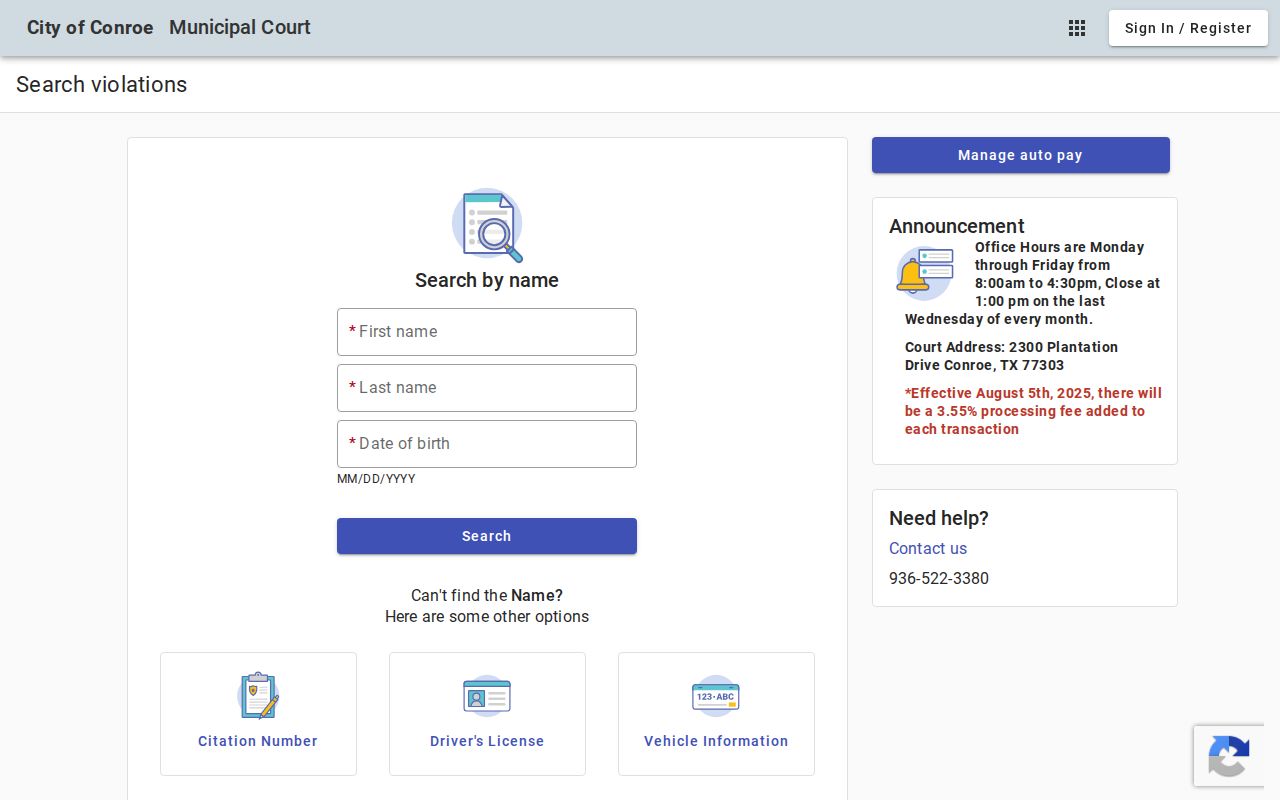
Conroe clearly uses a city-specific search. That makes it all the more important to keep the Conroe docket apart from the Montgomery County Clerk and District Clerk systems.