
Searching Montgomery County Civil Dockets
Start with the court named on the petition, notice, or prior order. The District Odyssey public route is the local starting point for district civil and family cases. County civil and probate matters appear through the County Clerk Odyssey portal. A justice-court case remains with its precinct clerk; JP3, for example, has a separate Court Records Inquiry route. The County Clerk's recording search is not a civil case docket, even though both systems use the words public search.
A cause number gives the narrowest match. If only a name is known, use a complete party name and confirm the court, style, and filing date before relying on a result. The District Clerk also offers a paid name search when the public route does not resolve the case. The search covers Montgomery County only and requires a complete name and a ten-year period.
- Read the court and cause number from an official case paper.
- Choose District Odyssey, County Odyssey, or the correct JP clerk.
- Search by the cause number first, or use the full party name.
- Match the court, case style, and filing date before opening the register.
- Ask the proper clerk for a plain or certified document when the docket lists an entry without an image.
Montgomery County Civil Docket Portals
Montgomery County does not have one civil search that covers every trial court. County Odyssey visibly separates Civil & Probate Case Records from Criminal Records and Court Calendar. The district route covers a different clerk and can redirect toward a sign-in page. If that route fails, the District Clerk Records and Research office is the correct fallback, not the County Clerk's property-record index.
The official County Odyssey source shows the three public access choices used for county civil routing.
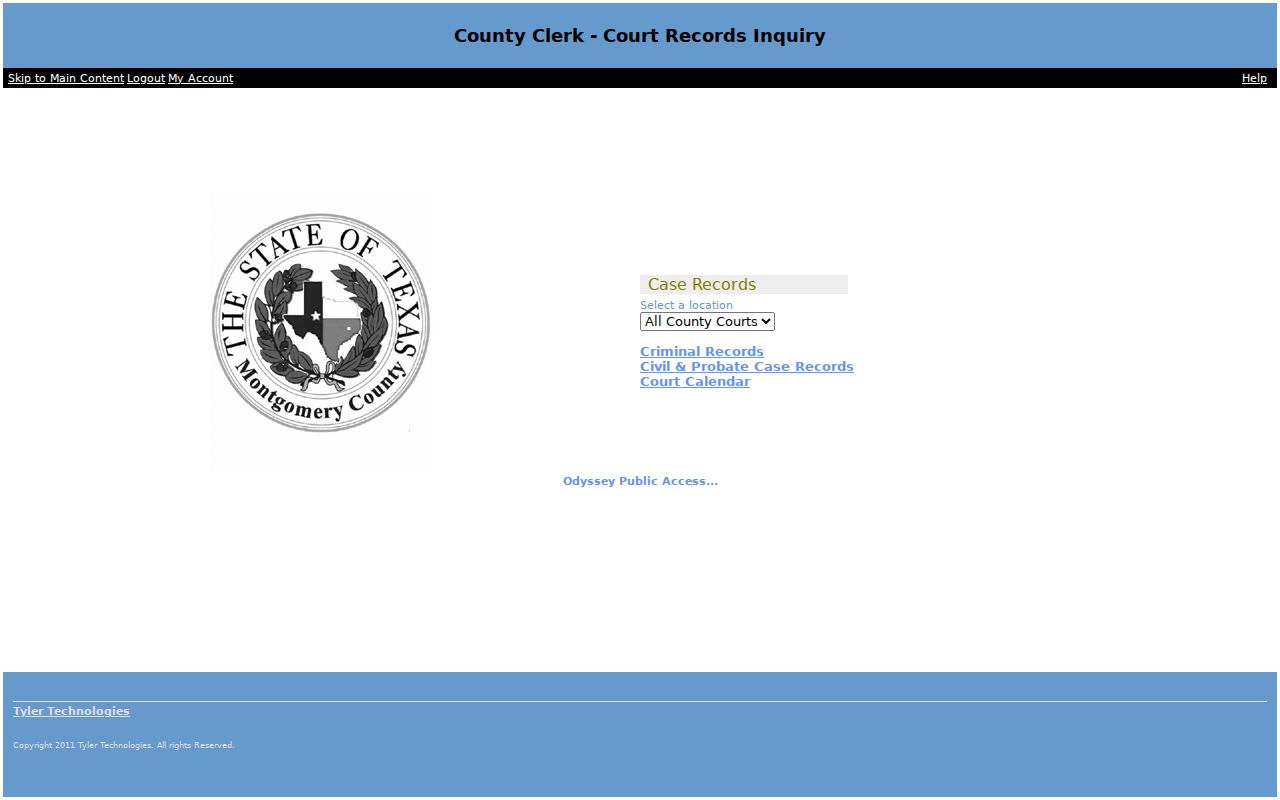
The captured screen helps distinguish the civil and probate route from the separate criminal and calendar choices.
| Case level | Search or custodian | Typical civil matter |
|---|---|---|
| District Court | District Clerk and District Odyssey | Major civil, family, and delinquent-tax cases |
| County court | County Clerk and County Odyssey | County civil and probate matters |
| Justice court | Precinct JP clerk | Small claims, eviction, and justice civil cases |
The official re:SearchTX portal adds a statewide layer. It can show a register of actions and documents where a participating court makes them available, but it should not be treated as a promise that every Montgomery County filing is online.
Inside a Montgomery County Civil Docket
A civil docket is a chronological register. Each line marks an event such as filing, service, setting, order, judgment, or dismissal. The register helps a reader track what happened and what may happen next. It does not prove that every underlying image is available remotely, and it does not replace a certified copy from the clerk.
| Cause number | The clerk's case identifier, which should be copied exactly from the record. |
|---|---|
| Case style | The names used to identify the parties in the lawsuit. |
| Event date | The date a filing, service return, setting, or order was entered. |
| Event description | The clerk's short label for the action recorded on that date. |
| Court and setting | The assigned court and any listed hearing date, time, or setting type. |
Terms can be brief. A continuance moves a scheduled event. A dismissal ends some or all claims, while a default judgment may follow when a party does not respond as required. Always read later entries because a newer order or reset can change the effect of an earlier line.
Montgomery County Civil Docket Documents
The local record separates the event from the paper behind it. A docket may state that an order was signed without offering a viewable order. Likewise, a motion entry shows that a request reached the court, not that the judge granted it. This distinction matters when confirming a judgment, a service return, or the exact terms of an order.
For the document, note the cause number, court, case style, exact document name, copy count, and whether certification is needed. The District Clerk Records and Research office handles district civil copies and older files. Its official instructions cover files from the 1900s to the present. County-level documents go through the County Clerk instead.
Plain district copies cost $1 per page. A certified district copy adds a $5 certification fee per document. Those charges are copy fees, not fees to read every public docket entry.
Civil Case Types on the Docket
Montgomery County civil dockets span several court levels. District courts take major civil disputes and family matters. County courts at law hear civil work assigned by statute. Probate Court No. 1 and the County Clerk route cover probate and estate records. Justice courts handle smaller civil claims and evictions within their authority.
- Contract, debt, and other general civil disputes
- Property, injury, and tax cases within the receiving court's authority
- Family cases kept by the District Clerk when public access permits
- Probate and estate matters routed through the County Clerk
- Small claims and eviction cases maintained by the correct JP clerk
The filing label alone may not reveal the right custodian. Confirm the court header. In Montgomery County, County Clerk and District Clerk are separate offices, so sending a request to the wrong one can delay a copy search.
Montgomery County Justice Civil Dockets
Justice-court civil records are decentralized by precinct. They do not automatically appear in the District Clerk or County Clerk view. JP1 is located in Willis, JP2 in Conroe, JP3 in The Woodlands, JP4 in New Caney, and JP5 in Magnolia. The correct precinct depends on the case, not simply the searcher's nearest counter.
JP3 maintains its own Odyssey Court Records Inquiry with Civil Case Records and Court Calendar choices. Other precinct routes should be confirmed with the relevant clerk because the county research did not establish one uniform public JP portal. A failed county-wide search is therefore not proof that no justice-court case exists.
Routing check: Use the court named on the citation, petition, or notice. A county property-record search cannot substitute for a JP civil docket.
Civil Docket Settings and Hearings
A setting is a scheduled court event, not always a trial. Montgomery County local rules distinguish several forms of settings and require court-specific scheduling steps. A docket can list a hearing, pretrial event, submission, conference, or trial date. The event label and the assigned court should be read together.
County Odyssey has a separate Court Calendar choice. A calendar view may show an upcoming setting without the full history, while the civil register can show an older date that was later moved. Review newer entries for a reset or continuance, then confirm the current setting with the responsible clerk or court coordinator. The Montgomery County court dates overview explains each confirmation channel.
Do not assume that 207 W. Phillips and 301 N. Main are interchangeable. Montgomery County district court offices appear at both addresses. The court number and the current setting notice control.
Montgomery County Civil Docket Filings
Texas civil filings commonly enter through eFileTexas when electronic filing applies. The eFileTexas system sends a filing to the clerk, but it is not the public docket viewer. After acceptance, the clerk maintains the case register and local Odyssey may expose the event to the public.
The sequence is useful in plain terms: Filing → Clerk acceptance → Docket entry → Setting → Hearing or ruling → Judgment or other disposition. A submitted filing may not appear as an accepted entry at once. When timing matters, check the filing receipt and ask the clerk rather than treating a blank public result as final.
- Filing
- A document delivered for the clerk to accept into the case.
- Setting
- A scheduled event before the court.
- Disposition
- The recorded outcome of a claim or case.
Civil Docket Access Rules
Public access in Montgomery County depends on the type of record and any restriction entered by law or court order. Court case records are not handled exactly like ordinary executive-agency records under the Texas Public Information Act. Texas Rule of Judicial Administration 12 governs judicial records, while adjudicative case files remain subject to court rules and specific confidentiality laws.
Key access rules:
Texas Rule of Judicial Administration 12 sets an access process for judicial records and lists exclusions.
Texas Judicial Branch open-records policy explains why court case records are not ordinary agency records.
Texas Family Code Chapter 58 protects juvenile information and limits disclosure.
Sealed or confidential material is not released merely because a docket exists. The District Clerk uses a sealed-record request form with a judge-order section for inspection or a certified copy. For an ordinary record, access may be online, at the clerk counter, by mailed copy request, by telephone guidance, through re:SearchTX, or through a written records process. No fax requests are filed under the District Clerk's published instructions.
Montgomery County Civil Search Gaps
The research review did not open a private party's live civil result. Exact result columns, page controls, downloadable attachments, and the current age of each index remain unverified. That limit matters because an online miss cannot prove that a Montgomery County civil case does not exist. It may sit in another court, use a different party style, predate the online range, or require clerk help.
Start with the court named on a notice or filing. Then try the matching Odyssey route, call the County Clerk or District Clerk, and use the counter, public terminal, mail, or official copy form when the web route falls short. This fallback keeps the search tied to the right civil custodian.